# Number

Processes the Databox value as numeric. If the Databox value is non-numeric, this expression will not work.

<table><thead><tr><th>Expression</th><th width="188">Databox Value</th><th width="98">Result</th><th>Comments</th></tr></thead><tbody><tr><td><code>Number > 12</code></td><td>12.34</td><td>True</td><td>Processes the Databox Value as Numeric and asks whether the Value is greater than the specified number – in this case 12</td></tr><tr><td><code>Number Format("F2")</code></td><td>12.3456</td><td>512.3</td><td>Will round to specified decimal places (“F2”)= 2 decimal places</td></tr></tbody></table>

#### Example

Numeric Expressions can be used in a variety of ways from quite simple maths to more advanced arithmetic. This allows a ‘behind the scenes’ approach to scripting; to only ask the necessary questions and to let the scripting do the work.&#x20;

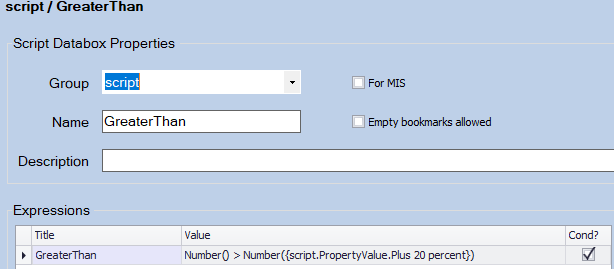
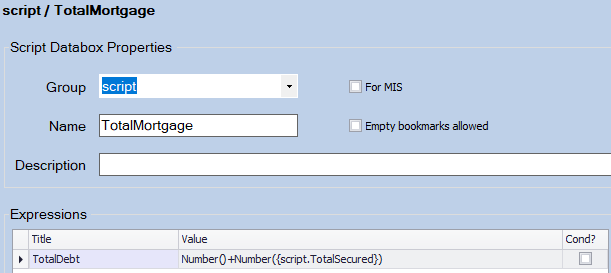
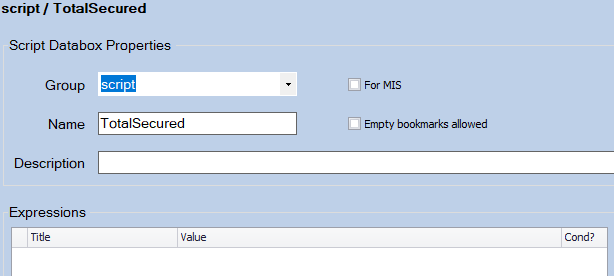
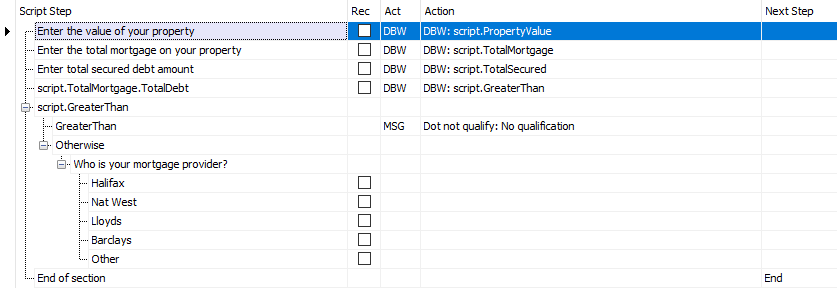
For example, let's work out whether an applicant for a mortgage rescue scheme has secured debt over the 120% criteria.

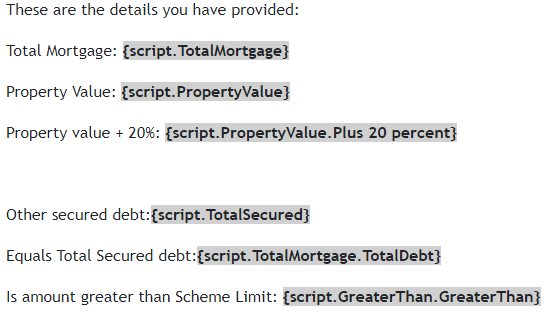
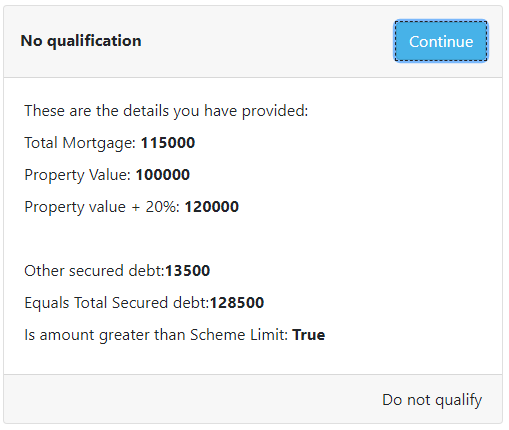
With just three Questions and Expressions, we can direct the script to ask the next question, knowing that the answer has already been worked out ‘in the background’ - (the last Message shows the Values of the Databoxes):

<figure><img src="/files/alAzGNGfyGqMkZhT9Be1" alt=""><figcaption><p>Collecting the information</p></figcaption></figure>

<div><figure><img src="/files/hrNtDDiEeKuBsrylIRTS" alt=""><figcaption><p>The GreaterThan Databox &#x26; Expression</p></figcaption></figure> <figure><img src="/files/Wbt37YadGfIm7hAz11j5" alt=""><figcaption><p>The PropertyValue Databox &#x26; Expression</p></figcaption></figure></div>

<div><figure><img src="/files/s7Q1KN5DPVHaYSV6mciB" alt=""><figcaption><p>The TotalMortgage Databox &#x26; Expression</p></figcaption></figure> <figure><img src="/files/NU2zN0t8xGzG7szteNhu" alt=""><figcaption><p>The TotalSecured Databox</p></figcaption></figure></div>

<div><figure><img src="/files/e0DaZbfzAroCmX2K25Xd" alt=""><figcaption><p>Message in the editor</p></figcaption></figure> <figure><img src="/files/97yKhRoV7HlSWnonUQGp" alt=""><figcaption><p>The result...</p></figcaption></figure></div>


---

# Agent Instructions: Querying This Documentation

If you need additional information that is not directly available in this page, you can query the documentation dynamically by asking a question.

Perform an HTTP GET request on the current page URL with the `ask` query parameter:

```
GET https://docs.keyfax.biz/product-suite/admin/databox-expressions/numeric-expressions/number.md?ask=<question>
```

The question should be specific, self-contained, and written in natural language.
The response will contain a direct answer to the question and relevant excerpts and sources from the documentation.

Use this mechanism when the answer is not explicitly present in the current page, you need clarification or additional context, or you want to retrieve related documentation sections.