> For the complete documentation index, see [llms.txt](https://docs.keyfax.biz/llms.txt). Markdown versions of documentation pages are available by appending `.md` to page URLs; this page is available as [Markdown](https://docs.keyfax.biz/product-suite/admin/advanced/base-task-templates/note-task-templates.md).
# Note Task Templates
How to set up Note Task Templates for use by your scripts.
### Overview
Notes are specific to each host integration. For example, one of the Keyfax integrations returns various codes (or classes) when they are consumed by the host.
To create a new Note Template, select Note from the Base Template Type described [here](/product-suite/admin/advanced/base-task-templates.md).
The Editing Pane now contains the Note Details for the Template:
Creating a new Note Task Base Template
### Properties
**Description** – describing the Task's role/purpose
The Editing Pane also contains the Text Area for adding and editing the Template text and layout. Use the Formatting Menu to create the style of document required.
To add Bookmarks (Databoxes) to the Template, place the cursor on the text area and click the '**+**' to the right of the selected Bookmark.
To edit an existing Note Template, select the Template in the Navigation Pane. Click **Edit** to make any changes. When complete click **Save**. To undo changes back to the last save click on **Restore**.
### Example
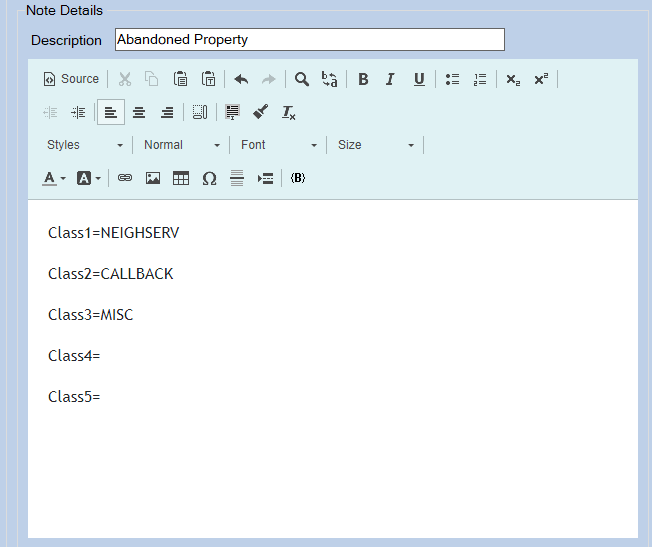
In this example, up to 5 items are returned to the host (calling) system. It is the responsibility of the host system to parse the exported data (which will include Notes) and further process these items:
Actual Note example used with Aareon QL
{% hint style="info" %}
**TIP** To add Databoxes to the note, drag and drop from the bookmark menu into the body.
{% endhint %}